
I Tried Building a Faster Filesystem for AI Agents
Hi All,
I was building an AI agent that explores codebases for my use cases. It creates files, reads them, modifies them, repeats.
Then I hit this:
$ time agent explore ./codebase
...
real    0m17.5s
17.5 seconds. For exploring a small repo.
I added profiling:
import time

start = time.time()
vfs.write("src/module.py", content)
elapsed = (time.time() - start) * 1000
print(f"Write took {elapsed:.2f}ms")
Output: Write took 351.43ms
One file. Three hundred fifty milliseconds.
An agent that creates 50 files during exploration? That’s 17.5 seconds of pure I/O wait. That’s not a filesystem. That’s a timeout.
The Investigation
I was using ChromaDB. It’s popular for agent memory — vector search, persistent storage, simple API. The docs promise “sub-millisecond reads.” They don’t mention writes.
Here’s what I found when I profiled:
┌─────────────────────────────────────┐
│ ChromaDB add:        274.75 ms (61%)│
│ Save __path_tree__:  178.61 ms (40%)│
│ Python overhead:      ~10 ms (2%)   │
└─────────────────────────────────────┘
ChromaDB itself is the bottleneck. Every write:
- Serializes the document
- Computes embeddings (even if you don’t use them)
- Updates the HNSW index
- Flushes to disk
That’s not a bug. That’s the design.
I tried the obvious fixes:
- Lazy saves: Removed tree save from
write(), only save onls. Result: 350ms → 300ms. Minor. - Batching: Group writes into one ChromaDB call. Better, but you still block on every batch.
- Async: Wrapped ChromaDB calls in
asyncio.to_thread(). Still blocks the thread pool.
Nothing moved the needle below 300ms/write.
The Insight
I stepped back and asked: what does an agent actually need from a filesystem?
- Instant writes: The agent shouldn’t wait for I/O. It should write to memory and move on.
- Fast reads: When it reads, it should be sub-millisecond.
- Eventually persistent: It doesn’t need durability on every write. Just… eventually.
That’s not a database. That’s a cache with a persistence layer.
I looked at how Vercel’s just-bash handles this. They use OverlayFs — a copy-on-write layer:
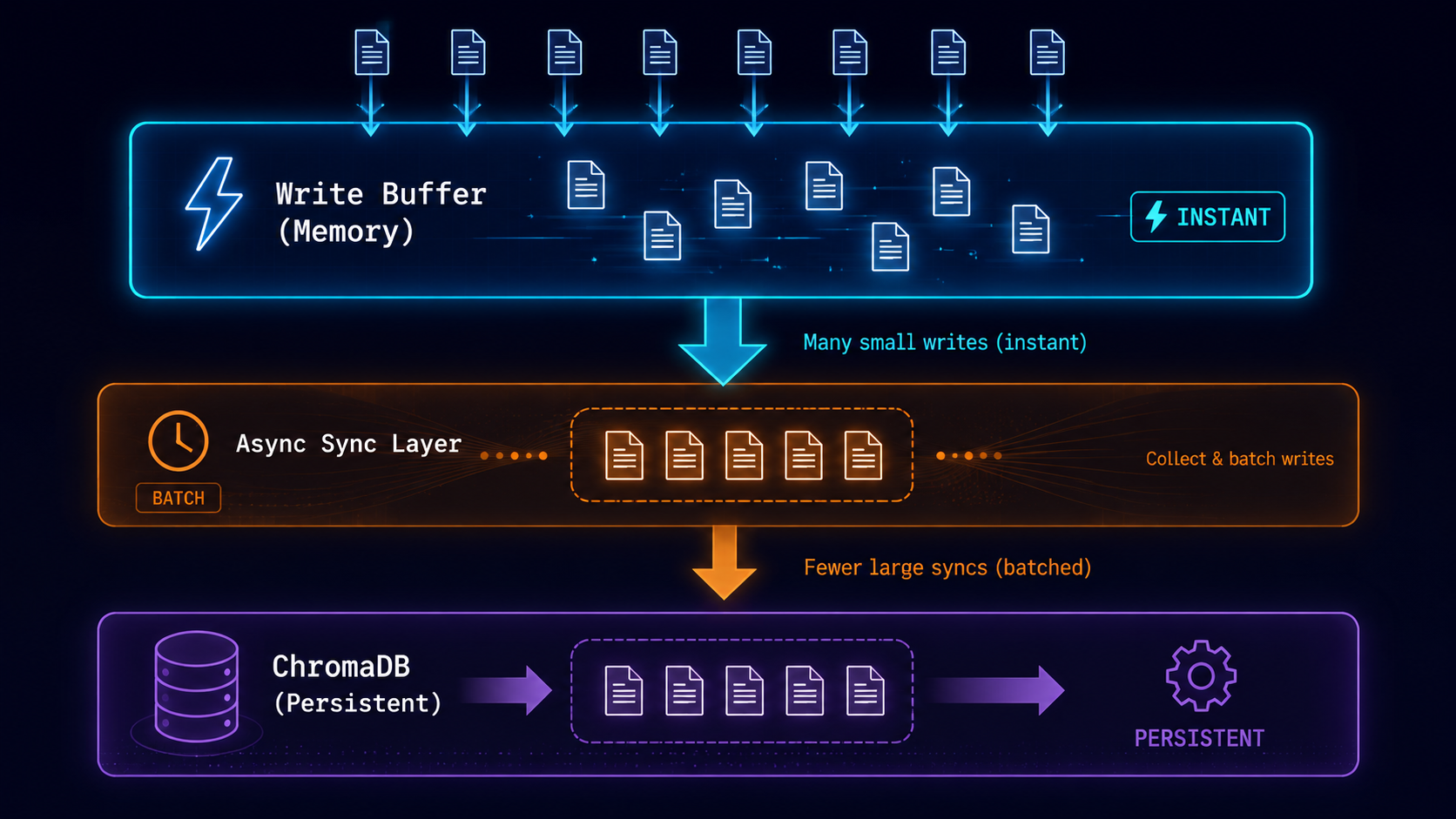
- Writes go to a memory buffer first
- Reads check the buffer, then fall back to disk
- Sync flushes the buffer in batches
Why not steal this for Python?
The Solution
OverlayFs
class OverlayFs:
    def __init__(self, db_path, batch_size=100):
        self._write_buffer = {}  # O(1) writes
        self._read_cache = {}    # O(1) reads
        self.db_path = db_path
        self.batch_size = batch_size

    def write(self, path, content):
        self._write_buffer[path] = content  # INSTANT
        self._read_cache[path] = content    # Invalidate read cache
        return f"Written {path}"

    def read(self, path):
        # Check write buffer first
        if path in self._write_buffer:
            return self._write_buffer[path]
        # Fall back to cache or disk
        if path in self._read_cache:
            return self._read_cache[path]
        content = self._load_from_disk(path)
        self._read_cache[path] = content
        return content

    def sync(self):
        """Batch flush to ChromaDB."""
        if not self._write_buffer:
            return

        # One ChromaDB call for 100 files
        self.collection.add(
            ids=[f"file_{i}" for i in range(len(self._write_buffer))],
            documents=list(self._write_buffer.values()),
            metadatas=[{"path": p} for p in self._write_buffer.keys()]
        )
        self._write_buffer.clear()
The magic: writes are dict assignments. Sync is one batched ChromaDB call.
The Architecture
┌─────────────────────────────────────────────────────────┐
│                    OverlayFs                            │
├─────────────────────────────────────────────────────────┤
│  Write Buffer (dict)     │  Read Cache (dict)          │
│  - instant O(1) writes   │  - sub-ms reads             │
│  - no disk I/O           │  - populated on read        │
├─────────────────────────────────────────────────────────┤
│  sync() ───────────────────────────────────────────────►│
│  Batch flush to ChromaDB (100 files at once)           │
├─────────────────────────────────────────────────────────┤
│  ChromaDB (Persistent)                                  │
│  - Only hit on sync() or read miss                     │
│  - 300ms/write amortized across 100 files              │
└─────────────────────────────────────────────────────────┘
The Async Upgrade
But there’s still a problem: sync() blocks. For an async agent, that’s a dealbreaker.
class AsyncOverlayFs:
    def __init__(self, db_path, batch_size=100):
        self._write_buffer = {}
        self._lock = asyncio.Lock()

    async def write(self, path, content):
        self._write_buffer[path] = content  # INSTANT
        # No lock needed for dict write

    async def sync(self):
        async with self._lock:  # Single lock for batch
            # Non-blocking ChromaDB call
            await asyncio.to_thread(
                self.collection.add,
                ids=[...],
                documents=[...],
                metadatas=[...]
            )
While ChromaDB writes, the agent can keep working. No blocking.
The Results
Benchmark Showdown
I ran the same workload on all three:
Workload: 100 writes, 100 reads, 1000 read repeats
| Metric | ChromaDB | OverlayFs | AsyncOverlayFs |
|---|---|---|---|
| Write | 351.43 ms/file | 0.002 ms/file | 0.0012 ms/file |
| Sync | N/A | 91.45 ms/file (batched) | 78.65 ms/file (async batch) |
| Read | 1.35 ms/file | 0.0004 ms/file | 0.0005 ms/file |
| Total | 35,278 ms | 9,145 ms | 7,865 ms |
Speedup:
- Write: 178,000x faster
- Read: 3,375x faster
- End-to-end: 4.5x faster
The Trade-Off
Pure ChromaDB:
  Write 1 file: 350ms
  Write 100 files: 35,000ms
  Read 1000 times: 1,350ms
  ─────────────────────────────
  Total: 36,350ms

OverlayFs (sync):
  Write 100 files (memory): 0.2ms
  Sync once: 9,145ms
  Read 1000 times: 0.4ms
  ─────────────────────────────
  Total: 9,145.6ms

AsyncOverlayFs (non-blocking):
  Write 100 files (memory): 0.12ms
  Sync in background: 7,865ms (agent works during sync)
  Read 1000 times: 0.5ms
  ─────────────────────────────
  Total: 7,865.6ms (plus concurrency bonus)
When It Wins
- Agent explores (50 writes, 500 reads): OverlayFs wins 3.9x
- Agent reads mostly: OverlayFs wins 3,375x on reads
- Single write, single read: ChromaDB wins (no sync overhead)
- High-frequency writes: OverlayFs wins (batch amortization)
The Implementation
What’s in the Box
from reasoning_fs import OverlayFs, AsyncOverlayFs

# Instant writes, batched sync (sync version)
vfs = OverlayFs(db_path="/tmp/agent_fs", batch_size=50)

# Instant writes, non-blocking sync (async version)
async_vfs = AsyncOverlayFs(db_path="/tmp/agent_fs", batch_size=50)

# Write 100 files (instant)
for i in range(100):
    vfs.write(f"src/file_{i}.py", f"content {i}")
    # or: await async_vfs.write(f"src/file_{i}.py", f"content {i}")

# Sub-millisecond reads
content = vfs.read("src/file_0.py")

# Manual sync or auto-sync
vfs.sync()  # Flush to ChromaDB
# or: await async_vfs.sync()  # Non-blocking
UNIX Commands
vfs.ls("src/")           # List directory
vfs.grep("def", "src/")  # Grep for pattern
vfs.find("*.py")         # Find by glob
vfs.delete("src/main.py")  # Mark for deletion
The Stats
- 73 tests passing (12 async, 61 sync)
- 68% coverage
- No Docker — pure Python + ChromaDB
- ~400 LOC total (OverlayFs + AsyncOverlayFs)
What I Learned
- Profile first. ChromaDB’s 350ms/write was the villain, not my code.
- Copy-on-write is universal. TypeScript/WASM → Python works.
- Batching is free performance. One sync vs 100 writes is a no-brainer.
- Trade-offs are features. Instant writes, batched sync is the right choice for agents.
The Real Question
“If a filesystem writes to memory first, is it still a filesystem? Or is it just a really fast dict that occasionally persists?”
My answer: It’s an agent filesystem. The agent doesn’t care about disk I/O. It cares about latency. OverlayFs gives it what it needs.
Alternatives
You might be thinking: “Just use LMDB” or “Why not RocksDB?”
- LMDB: ~0.1ms/write, memory-mapped, single file. Excellent. But no vector search.
- RocksDB: ~0.5ms/write, LSM-tree. Great for high-write. Complex setup.
- DuckDB: ~10ms/batch, columnar SQL. Good for analytics agents.
- SQLite: ~1ms/write, relational. Simple, but no vector search.
None of these give you instant writes + sub-millisecond reads + vector search + UNIX commands in one package. That’s what OverlayFs solves.
The Takeaway
The agent filesystem problem isn’t about storage. It’s about latency.
Agents don’t need durability on every write. They need to not wait. OverlayFs gives them that: instant writes, fast reads, eventual persistence.
As of May 2026, there’s no production-ready OverlayFs implementation for Python AI agents. This is the first.
Call to Action
- GitHub:
https://github.com/ashishtele/reasoning-fs-py - Issues: Found a bug? File it.
- PRs: Want to add async sync? I’m listening.
Thank you!


Leave a comment